A Fake IT Support Call on Teams Ended With Certificates for Domain Controllers. Microsoft Says No Teams Flaw Was Involved. The Fix Is in Your Certificate Authority.

If your company runs Active Directory with its own certificate authority, check two things this week: which certificate templates accept an identity supplied by the person asking, and whether your certificate web enrollment page accepts relayed logins. Microsoft Threat Intelligence described two intrusions that began with a fake IT support call on Teams and ended with certificates for privileged accounts, including one for a domain controller. Microsoft says the activity exploited no flaw in Teams. The weak points were certificate configuration and a person who said yes.
We read a secondary report of Microsoft's research, published October 30, not Microsoft's post itself, so the details below are only as good as that report.
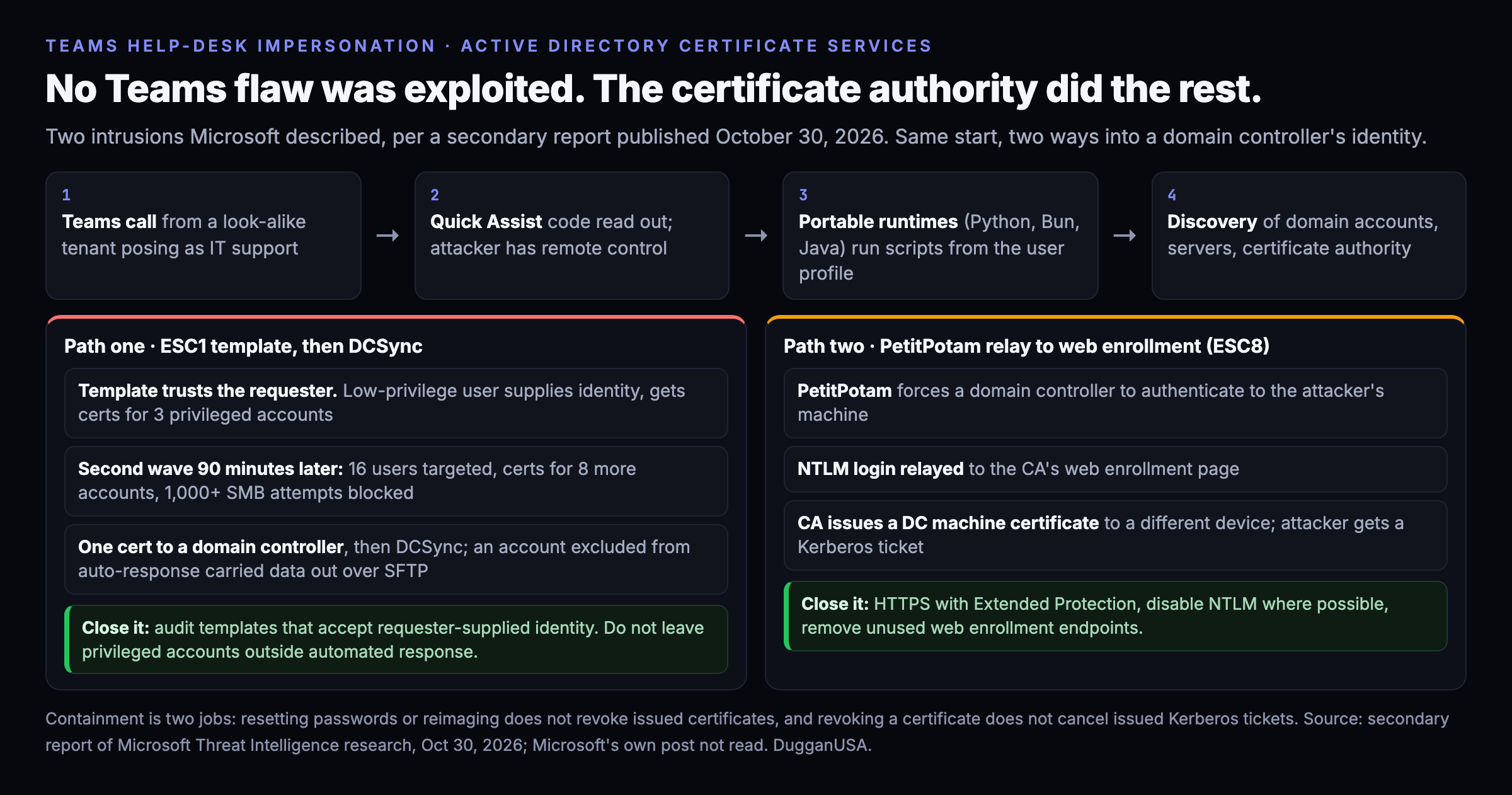
How it starts
An attacker contacts an employee on Teams from a look-alike account, with an onmicrosoft.com tenant name and a display name such as support or help desk. The caller persuades the person to open Quick Assist and read out a connection code, which hands over remote control. The attacker then unpacks an archive into a new folder in the user's profile and runs portable Python, Bun or Java runtimes from that user-writable path, which the report says avoids conventional malware signatures. Discovery follows: system information, network configuration, running processes, and connections to domain infrastructure.
Microsoft's earlier research on the same pattern, published September 2, described the install of a malicious Windows Installer package and movement with Windows Remote Management toward domain controllers and certificate authorities.
Path one: a template that trusts the requester
In the first intrusion, a certificate template was vulnerable to what the security community calls ESC1. It lets a low-privileged requester supply identity data and receive a certificate for a privileged account. The attacker obtained certificates for three privileged accounts. Microsoft Defender's automated disruption restricted them, but one privileged account had been excluded from automated response.
About 90 minutes later a second wave targeted 16 users, compromised another workstation and obtained certificates for eight more privileged accounts. Over 1,000 SMB attempts were blocked. With one certificate, the attacker authenticated to a domain controller and ran DCSync, which copies password material out of the directory. The excluded account then supported file server access, a renamed copy of the Rclone transfer tool, and exfiltration to an external SFTP server.
The report's lesson is the exclusion. The one account the automation was told to leave alone is the one that carried the data out.
Path two: relaying a domain controller's own login
In the second intrusion there was no vulnerable template. The attacker used PetitPotam to force a domain controller to authenticate to a machine the attacker controlled. That login was relayed to the certificate authority's web enrollment page, which is ESC8. The authority issued a certificate for the domain controller's machine account even though the request came from a different device. The attacker used it to obtain a Kerberos ticket-granting ticket. Defender raised ESC8 alerts, the customer isolated the workstation, and no further activity was seen.
What to do
- Audit your certificate templates. Find any template that lets the requester supply the subject or identity, and remove that setting unless a business process needs it. This is Microsoft's recommendation as the report states it.
- Fix web enrollment. Use HTTPS with Extended Protection, disable NTLM where you can, and remove web enrollment endpoints you do not use.
- Patch the July flaw too. Certighost, CVE-2026-54121, is a separate certificate authority bug that let an ordinary domain user get a domain controller's identity. We covered it in July. If your authority never took the July 2026 update, that comes first.
- Do not exclude privileged accounts from automated response unless you have written down who watches them instead. This one is our reading of the first case, not a Microsoft instruction.
- Treat Teams like email. Restrict external access and federation to domains you trust, and verify any unsolicited support request through a channel you already know. Limit Windows Remote Management to authorized management workstations, and apply attack surface reduction rules.
- Contain in two steps. Resetting a password or reimaging a workstation does not revoke certificates that were already issued, and revoking a certificate does not cancel Kerberos tickets already issued. They are separate tasks.
What we do about it, and what we cannot
We are not a news site, so here is where we stand, as of this writing.
- There is nothing to block yet. The reporting we read publishes no IP addresses, domains or file hashes. The only names are a renamed Rclone binary and, from the September research, installer names that look like "devfix" and "Hotfix". Those are too generic to put in a blocklist without blocking innocent software, so we have not. If Microsoft or an incident response firm publishes infrastructure, we ingest it the same day with the actor attached, and add a dated update here.
- Our edge cannot see this. The edge shield protects web properties placed behind it. A Teams call and a certificate request inside your network never touch it. Your protection is the configuration list above.
- We checked our own corpus. A search of our indicator and actor indexes for this campaign returned nothing, which is a limit of the public reporting, not a finding about you.
Free API keys for our blocklist feed are open to anyone, and the day indicators exist, they are the first thing to go in.
Limits
Everything here comes from a secondary article dated October 30 and a September 2 trade-press summary of Microsoft's earlier research. We did not read Microsoft's own posts. The report names no threat actor, and neither do we. The 90-minute gap, the 16 users and the counts are as the report states them. We have not tested any of the attack steps.
Five percent of this is wrong somewhere. It always is.
Was this useful? Rate this post. The widget is at the bottom of the page, and we read every response.
Every indicator in this post is in the feed. Free.
1.58M+ IOCs, STIX 2.1 / TAXII, 88% novel vs ThreatFox, exploited-CVE leads ahead of CISA. No credit card — a free API key in 30 seconds, and you can audit every claim above against the live endpoints.