Check Your GitHub Workflows for the Hidden-Command Bug Behind Radware's Campaign: A Free Pull Request Check, Two Minutes to Add

Yesterday Radware published a campaign that hid shell commands in the titles, bodies and comments of 83 GitHub issues and pull requests across 61 repositories. In at least two projects the maintainers' own automation ran them. The bug is not exotic. It is a way of writing a workflow step that thousands of repositories have in them right now. This post shows how to find it in yours in about two minutes, and how to fix it.
The one-sentence version of the bug
When a workflow step contains an expression such as the issue title, GitHub pastes the text into the script before the shell runs it. If the title contains command syntax, the shell executes it, even inside quotes. Nobody has to approve anything, and the workflow fires within a second of the event.
Add the check
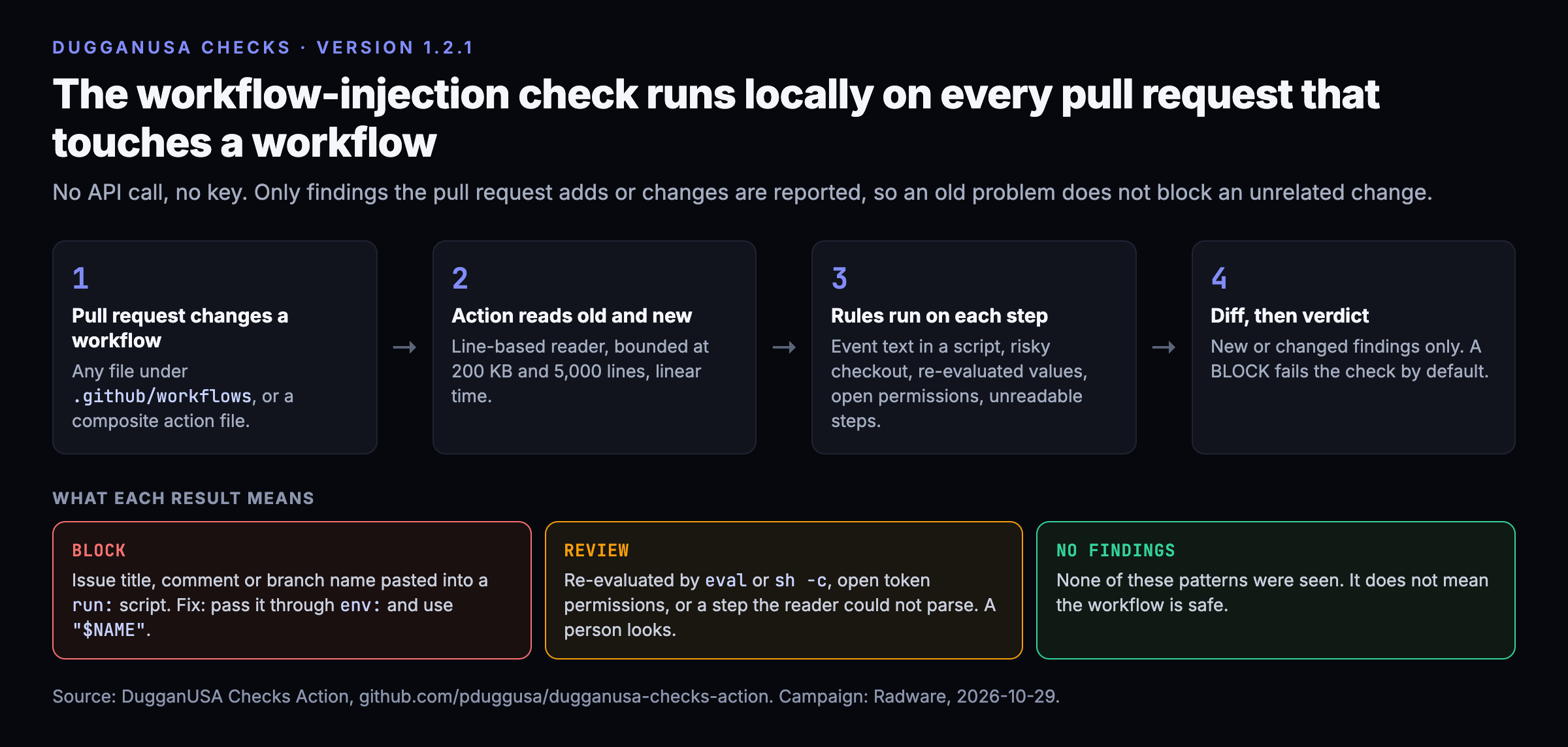
The DugganUSA Checks Action reads your workflow files and flags this pattern in a pull request, before it merges.
- In your repository, add a workflow file at .github/workflows/dugganusa-checks.yml that runs on pull_request, with permissions: contents: read.
- Give it two steps: actions/checkout@v4 with fetch-depth: 0, then pduggusa/dugganusa-checks-action@v1.
- That is the whole setup. The workflow-injection check is on by default and runs locally inside the job. It makes no API call and needs no key. The same Action also checks new dependencies and MCP servers, and that part uses a free DugganUSA key if you add one as the secret DUGGANUSA_API_KEY.
The full quickstart, with the exact file, is in the repository README: github.com/pduggusa/dugganusa-checks-action. The input that controls this check is check-workflow-injection, default true.
What it flags
- Event text inside a script (BLOCK). An issue or pull request title or body, a comment, a review, a head branch name, a commit message or an author name, pasted into a run: script or a github-script body. This is exactly the Radware pattern. Spelling variants, such as different capitalization or bracket form, and whole-object references such as serializing the entire issue, count too.
- A privileged trigger that checks out the pull request head (BLOCK). The workflow runs with your secrets and then builds the contributor's code.
- Event text that is re-evaluated (REVIEW). The value went through an environment variable, which is right, and then into eval, sh -c or source, which undoes it.
- Outside users can trigger a job that has open token permissions (REVIEW). No permissions block, or write-all.
- A step the check could not read (REVIEW). Unusual YAML styles that a line-based reader cannot follow are reported for a person to look at, never passed quietly.
- An AI agent action on a workflow anyone can trigger (advisory). The same boundary as a shell script, with a model in the middle.
On a pull request, only findings that the pull request adds or changes are reported, so an old problem does not block an unrelated change. A push or scheduled run scans everything.
How to fix a finding
Pass the value through an environment variable and read it as data. In the step, add an env: entry such as TITLE: ${{ github.event.issue.title }}, and in the script refer to "$TITLE". Then the shell receives the text as a value and never as part of the script. Do not hand that variable to eval or sh -c afterward. Give the job the least token permission it needs, and keep any job that reads outside text apart from jobs that hold deployment keys.
What we found in our own
We ran it on our own twenty-four workflows before announcing anything. It found one real injection: a workflow triggered by another workflow's completion pasted that run's display title and branch name into a bash step. We moved both to environment variables. It also found a notification workflow with no permissions block, which now declares read-only. All twenty-four scan clean today. Our private repository has no issue-triggered or comment-triggered workflows and no pull-request-target trigger.
Check what already happened
Radware's collection server was 54.205.16.142 on port 8443. If your workflow logs from September 1 show a connection to it, treat every secret that job could see as exposed, rotate them, and read your audit log. The address and the three collection URLs Radware published are in our feed, credited to Radware.
Limits
This is a pattern check on text. It reads workflow files with a line-based reader, not a full YAML parser, so it can miss an unusual construction, and it says so with a REVIEW when it cannot read a step. It does not run your workflow, does not follow reusable workflows in other repositories, and does not know which of your repositories are exposed to outsiders. No findings means none of these patterns were seen. It does not mean the workflow is safe. An independent automated review of our first release found real gaps, and we fixed them in version 1.2.1; two further rounds of hardening are committed and will ship in the next release. We have not seen this check catch an attacker. It catches the mistake an attacker needs.
Five percent of this is wrong somewhere. It always is.
If this was useful, or was not, rate it at the bottom of the page.
How do AI models see YOUR brand?
AIPM has audited 250+ domains. 15 seconds. Free while still in beta.
Audit your site now → aipmsec.com
Was this useful? Thirty seconds, no cookies, no tracking, no third parties, your address hashed and never stored. The question lives here: https://analytics.dugganusa.com/nps.html#post=check-your-github-workflows-for-the-hidden-command-bug-behind-radware-s-campaign-a-free-pull-reques