Check Point Bypassed ChatGPT's Lockdown Mode With a Popup That Escaped the HTML Preview Sandbox. In the Desktop App, Just Having a Conversation Was Enough. OpenAI Fixed It September 18.

Nothing to patch on your side. Check Point Research says OpenAI fixed this flaw on September 18, 2026, and that Check Point retested and confirmed the technique no longer works. If you or your team use ChatGPT's Lockdown Mode because you handle sensitive data, the useful lesson is what the flaw shows about the setting. Lockdown Mode is a promise to cut off the paths data takes out of a conversation, and for a time one of those paths was open. Check Point's report describes no exploitation in the wild, and we have no evidence of any.
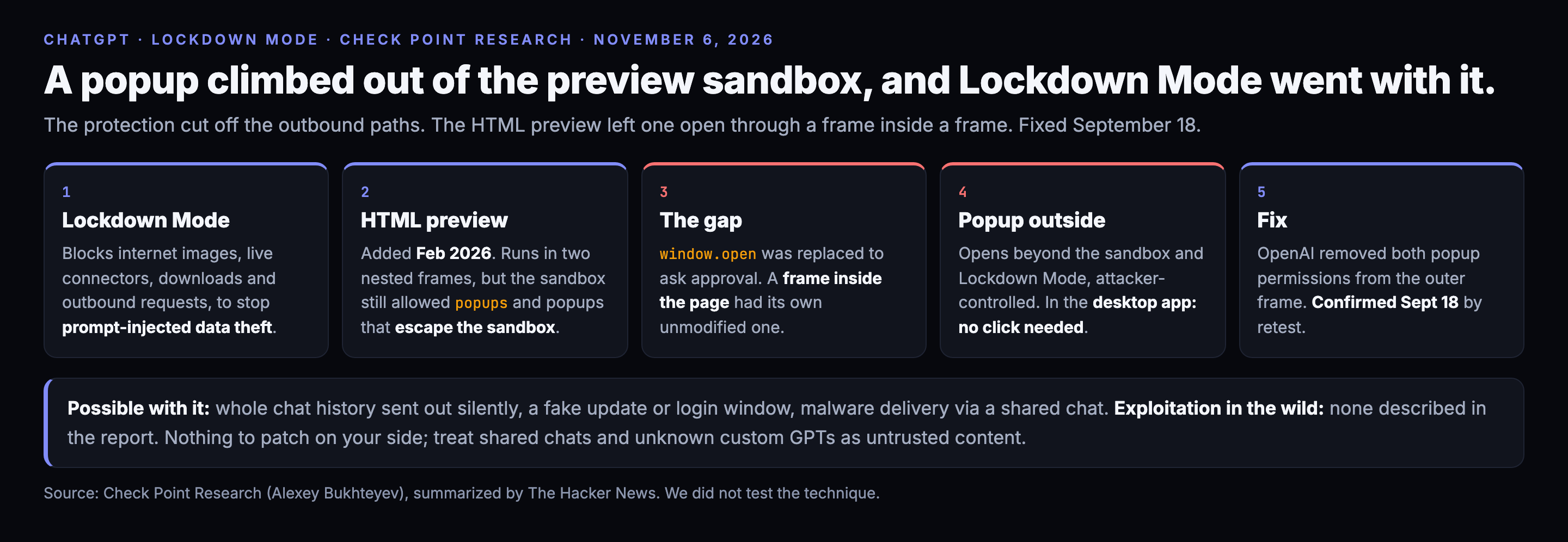
What Check Point found
Lockdown Mode is an optional setting for logged-in ChatGPT users. When on, it limits live web access to cached content, blocks images loaded from the internet, stops network requests from Canvas code, and turns off Deep Research, Agent Mode, live connectors and file downloads. It exists because of a known trick: an attacker gets the model to load a link carrying private data in its address, and the data lands in the attacker's server logs.
In February 2026 ChatGPT gained an HTML page preview for code blocks. Rendering code from a prompt, a custom GPT or a shared chat is risky, so the preview runs in two nested sandboxed frames and intercepts requests to outside resources, surfacing them as approval dialogs. Check Point's research, by Alexey Bukhteyev, found a gap in how popups were handled. The sandbox attributes still allowed popups, and allowed popups to escape the sandbox. ChatGPT blocked popups by replacing the page's window.open function with one that asks for approval. But a page can create another frame inside itself, and that frame has its own unmodified window.open. A popup opened that way is not subject to the preview's restrictions, and because popups were allowed to escape the sandbox, its content runs outside it. That includes Lockdown Mode's protections.
What it allowed
Check Point describes four scenarios, each with demonstration video.
- Silent chat theft. In the Electron-based ChatGPT Classic desktop app, window.open worked without a click. A malicious custom GPT could send the whole chat history to an attacker's server just because the user was talking to it. Check Point says this needed zero user interaction.
- Malware through a spoofed window. The popup keeps the ChatGPT icon, and the attacker sets the title, so a fake "ChatGPT update" looks native. The desktop app does not download files automatically, so the user had to click, but a browser does not block automatic downloads, and a victim does not need an account if they open a shared chat.
- Credential theft. Check Point could reload content in the main app window and sign the user out, then present a login page the attacker controls.
- Phishing with arbitrary content shown in a popup the user takes to be part of ChatGPT.
The delivery routes are a malicious prompt, a malicious GPT, or a shared chat.
The fix
OpenAI told Check Point on September 18 that it had removed the allow-popups and allow-popups-to-escape-sandbox permissions from the outer HTML-preview frame. Check Point retested and says the technique no longer works. Public disclosure came on November 5, which is seven weeks later. We found no CVE for this and Check Point does not cite one.
What to do
- You do not have to patch. If you run ChatGPT Classic, keep it updated as a matter of habit.
- Do not treat a shared ChatGPT conversation as a safe document. A shared chat can carry rendered HTML. Click nothing in one that you did not make, and be wary of any window that asks you to update or sign in.
- Be careful with custom GPTs from unknown authors, especially in the desktop app, where the flaw needed no click.
- If your organization relies on Lockdown Mode as a control, record it as a risk reduction, not a guarantee. Check Point's own conclusion says guardrails help but offer no absolute guarantee.
- Keep truly sensitive material out of a chat where you cannot account for every feature that renders content.
The recommendations are our reading. Check Point and OpenAI publish no formal customer guidance beyond the fix.
Why it matters
The model was not the weak point. The flaw was in a convenience feature around it: a preview pane that renders code. That is the pattern across AI assistants this year. Each new capability, such as running code, rendering pages or calling tools, opens a path that the security setting then has to cover. We wrote last week about a different group of flaws in the embedded browsers inside five AI developer tools (https://www.dugganusa.com/post/ai-dev-tools-embedded-browser-flaws-codex-vscode-chatgpt). That was a separate finding by another firm, though it rests on the same trust problem: an embedded browser is treated as more trustworthy than it should be.
What is not known
Whether anyone exploited this before the fix. How long the popup hole existed; the preview feature dates from February 2026, but Check Point does not say when the permissions were set. How many users had Lockdown Mode on. The report publishes no hashes, domains or addresses, so there is nothing to put in the feed, and we ingested nothing.
Limits
We read Check Point's report in full and The Hacker News's summary. We did not test the technique and did not see the videos. We did not verify the fix independently; we rely on Check Point's retest.
Five percent of this is wrong somewhere. It always is. If OpenAI has said more about the timeline, we will add it.
Was this useful? Rate this post. The widget is at the bottom of the page, and we read every response.
Every indicator in this post is in the feed. Free.
1.58M+ IOCs, STIX 2.1 / TAXII, 88% novel vs ThreatFox, exploited-CVE leads ahead of CISA. No credit card — a free API key in 30 seconds, and you can audit every claim above against the live endpoints.